Follow a Memory from retrieval to publication
This walkthrough follows one fictional document, Deployment rollback checklist, at deployment-rollback.md. It explains what the user does, what data changes, and what success means at each boundary.
Read Understand Clumsies first if Memory, Draft, and Project are new terms. This is a system walkthrough; the quickstart walks you through the practical steps.
The whole journey
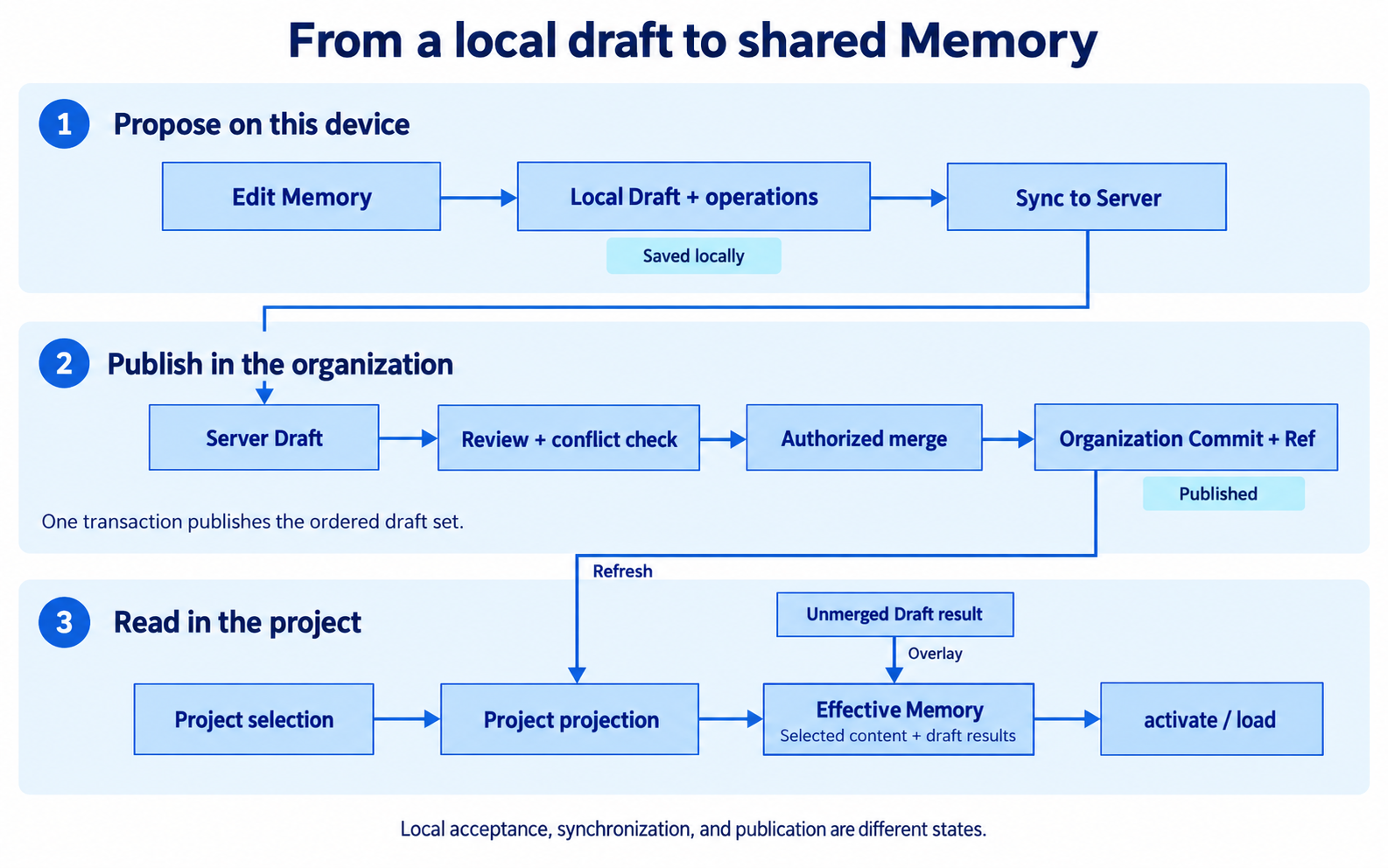
Text equivalent:
Organization publishes the checklist
  → administrator selects it for Payments Project
  → daemon installs the Project snapshot
  → agent activates relevant passages and loads the full checklist
  → an explicitly requested change becomes a local Draft operation
  → daemon uploads that operation to a Server Draft
  → author submits Drafts for Review
  → administrator approves and merges
  → Server creates an organization Commit and updates affected Project projections
  → each daemon installs its new snapshot and prepares retrieval
Saving a Draft and publishing a Commit are separate events. Network synchronization sits between them, and local retrieval readiness follows publication.
1. Make the checklist available to a Project
User action. A Project administrator, or an organization owner or administrator with access to Payments, selects the checklist for the Project. The local repository is bound to that Project.
Server data. A Project selection stores the IDs of selected organization Memory. Server creates a Project snapshot from that selection and moves the Project Ref to it. The organization checklist itself is unchanged.
Local data. The daemon records the repository-to-Project binding on this Mac. It downloads the Project Commit, its Tree, and referenced content, then installs a complete local generation.
A Tree describes the resources in a snapshot. A Blob stores immutable content. “Generation” is the daemon's complete local installation of a snapshot.
Result. The checklist can participate in that Project's local retrieval once the required snapshot and search index are ready. Another Project that has not selected it does not gain it merely because it exists in the organization.
Related boundaries: Project selection is a Server operation; repository binding is a local daemon operation. They are not the same setting.
2. Find relevant guidance, then read the source
User action. The developer asks the agent to prepare a deployment rollback.
Agent call. The host calls the single MCP tool, memory, with an activate operation:
{
  "op": {
    "activate": {
      "query": "Prepare a deployment rollback and find the team's rollback checklist"
    }
  }
}
The App-bundled MCP proxy forwards this to the resident daemon over macOS XPC. The daemon uses the bound Project's Effective Memory: the installed snapshot plus current local Draft operations.
Activation finds and ranks fragments. It returns source identity and content, so the agent can decide which documents need a full read. It does not load the whole organization library into every task.
The agent then calls:
{
  "op": {
    "load": {
      "ids": ["deployment-rollback.md"]
    }
  }
}
load resolves a known ID or exact path and returns the complete resource, including its stable ID and content hash. The hash identifies the content version the agent actually read.
Result. The agent has context for the task. No Draft or published record changes.
Activation's optional state token tracks previously returned fragments. Reuse it only while those fragments remain in the agent's context. Start without it after compaction or a fresh task; it is not a login token or a permanent conversation archive.
3. Save an explicitly requested improvement
User action. The developer says, “Add a post-rollback verification step to this checklist.”
Agent call. After reading the complete document, the agent submits exact text replacements using the returned stable ID and hash:
{
  "op": {
    "store": {
      "update": {
        "id": "mem_example_rollback",
        "expected_hash": "replace-with-the-hash-returned-by-load",
        "replacements": [
          {
            "old_text": "Confirm the previous version is running.",
            "new_text": "Confirm the previous version is running. Verify the health check and a sample request."
          }
        ]
      }
    }
  }
}
The ID, hash, and text above are illustrative. A real update must use the values from the actual load result.
Local validation. The daemon checks that the resource is a valid target, its content still matches expected_hash, and the replacements match. If the document changed, it returns an error instead of applying the edit to different content.
Durable write. In one SQLite transaction, the daemon creates or reuses a Draft, writes the operation to local_draft_operations with sync_status = queued, and queues the Project index refresh. It then wakes its background workers.
Result. A response with queued: true means the operation was accepted locally. It does not prove Server has received the change. The Project's Effective Memory incorporates the Draft through the local read/index pipeline; until the matching index is ready, retrieval may report a preparation state.
Desktop editing follows the same durable Draft queue. The agent does not need to keep its MCP process alive for synchronization to continue.
4. Synchronize the proposal
Background action. The daemon creates or reuses the corresponding Server Draft, uploads queued operations, and pulls updated Draft state.
A Draft records the organization Commit that the proposal was based on, its author, carrying Project, operation history, and version. The daemon associates the local Draft with its Server identity.
Result. Server has the proposal. The author can submit it for Review once the required operations are synchronized. The organization's published checklist has still not changed.
If Server is unreachable, the durable local queue remains. Fix the reported connection or authentication problem and let synchronization retry. Repeatedly creating the same proposal is not a substitute for checking the existing Draft's state.
If a request response is lost, an error alone cannot tell you whether Server applied the request. Refresh the existing Draft or Review before deciding whether a retry is needed.
5. Reconcile with a newer published version
While the developer was editing, another administrator may have published a newer checklist. The Draft then becomes behind: its base Commit differs from the current organization Ref.
Clumsies compares three states:
| State | Meaning |
|---|---|
| Base | The published content the Draft started from |
| Current | The content at today's organization Ref |
| Draft | Base with the author's operations applied |
A reconciliation candidate captures that comparison for a particular Draft version and current Commit. Requesting or viewing a candidate does not apply it to the Draft.
Desktop offers Merge latest version. The user inspects the result and confirms it. When changes overlap, the user resolves the conflicting content. Even a clean candidate is not a license to silently rewrite the author's Draft.
A current Draft can be submitted directly. A behind Draft can be submitted with its valid candidate and any required resolution; Server coordinates the submitted Drafts inside the Review-creation transaction. The candidate must still match the Draft version and current Ref.
Failure outcome. If the Draft or shared Ref changes again, the stale confirmation is rejected or a new comparison is required. Published content is not overwritten. Refresh and review the new candidate.
6. Submit, discuss, approve, and publish
Author action. The author selects one or more Drafts, gives the Review a title and explanation, and submits them in a defined order. All Drafts must belong to the same Project and author and satisfy current publication rules.
Server checks. It validates each Draft version and the expected organization Ref. The Review records the ordered Draft IDs. Comments and decisions also refer to a specific Review version so they cannot silently act on a different revision.
Reviewer action. An organization owner or administrator can reject the proposal or approve and merge it. A normal Project member can propose and discuss changes but cannot publish them.
The current Desktop approval action uses the merge endpoint to approve and publish an Open Review in one transaction. The API also retains a separate Approved state and can merge a previously Approved Review. Approval alone is not publication.
Publication transaction. Server applies the complete ordered Draft set, creates an organization Commit, advances the organization Ref, updates affected Project projections, and marks the Review and Drafts as merged. A newly created organization Memory is also selected for its originating Project.
The whole Draft set publishes atomically. A stale Ref or an unresolved conflict prevents publication; it does not publish just the first few files. Rejecting a Review reopens its Drafts for editing and later resubmission.
7. Make the new version usable on every Mac
Server result. The organization now has a published version. Projects that selected the affected Memory receive updated projection snapshots.
Local follow-through. Each daemon fetches its Project Ref and Commit content, prepares a complete local generation, and updates the derived search index. The daemon protects the generation boundary so a reader does not receive a mixture of two snapshots.
Result. Once the local view and required index are ready, the next activation or load can use the new checklist. Publication does not push text into an agent conversation that already has older text in context; the agent must retrieve again.
Closing Desktop does not stop the resident daemon's workers. Closing the short-lived MCP proxy does not discard the local queue.
Locate a failure by its boundary
| What you observe | Boundary to inspect | What to do next |
|---|---|---|
| Agent cannot resolve the Project | Repository binding / host runtime | Check the repository binding and restart the agent task after a binding change |
| Activation reports models or index preparing | Local retrieval preparation | Inspect readiness/progress; retry when preparation completes |
Update reports memory_content_changed | Content concurrency check | Load the current document and formulate replacements against that version |
| Draft remains queued | Local-to-Server synchronization | Check sync status, connection, and sign-in; retry the existing Draft |
| Review requires reconciliation | Draft base versus current organization Ref | Inspect and confirm the Base/Current/Draft comparison |
| Review request succeeded but the page is still loading | Review detail and diff loading in Desktop | Inspect subsequent reads and rendering readiness separately from submission |
| Review merged but the agent sees older guidance | Project snapshot/index synchronization or existing agent context | Check local readiness, then retrieve again |
| Project storage is unavailable | Configured local storage location | Reconnect the volume or restore permission; do not edit managed cache files |
See architecture for the ownership boundaries and domain APIs for the request contracts.
Evidence and deeper reading
This walkthrough is based on the checked-in implementation at 5d038ff; it does not assume unpublished changes in other branches.
| Behavior | Source or executable coverage |
|---|---|
| MCP validation and operation shapes | MCP contract |
| Hash-checked updates and durable queue acknowledgment | Daemon state |
| Local Draft overlays in retrieval | Search overlay |
| Candidate checks, Review creation, and atomic publication | Review persistence |
| Multi-Draft merge preserves operation order | Draft operation ordering tests |
| Published changes reach two daemons and survive restart | Server integration tests |